 Mac Duo
Your lid, made of glass.
Close your MacBook and the display lifts away as a pane of frosted glass. It reads the hinge sensor, so it moves at the speed of your hand. Stop, and it stops. Open it again and the whole thing retraces itself.
Pay once. Yours on up to 5 Macs. No account, no licence key.
MacBook Pro 14″/16″MacBook Air 13″/15″Check compatibility →
85,792+
MacBook folds and counting.
Reactions
Why people love Mac Duo
What it does
A material. A small event, every time.
A pane of frosted glass, hinged along the bottom edge of your display and moved by your lid. The idea comes from the fold on iPhone Duo. The glass is modelled — it lifts, leans and catches the light — rather than painted over a screenshot.
01
Your lid moves it. Nothing else does.
The fold reads the lid-angle sensor directly. Move slowly and it moves slowly. Stop halfway and it holds there. Reverse, and it unfolds.
02
Clear where it touches. Frosted where it lifts.
The pane lifts off the display as it tilts. The gap is nothing at the hinge and grows toward the top, so the bottom of your screen stays almost untouched while the top frosts over.
03
Etched glass, not a blur.
Grain in the material, and no highlights — etched glass scatters light, it doesn't reflect it. The frost climbs with the gap between pane and screen, so the bottom of your display stays clear and the top goes milky. Not a blur laid over a screenshot.
The app
See every change. Without closing a thing.
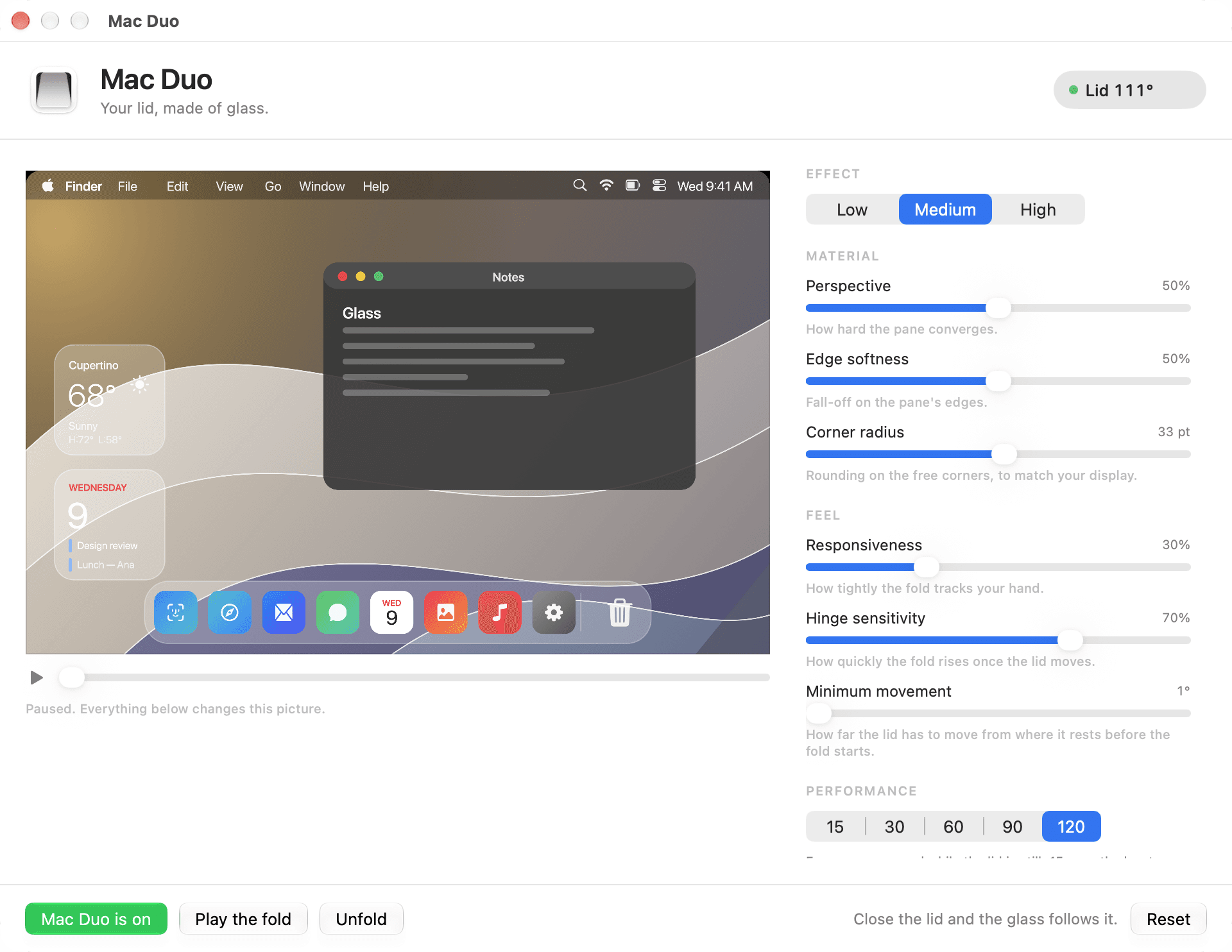
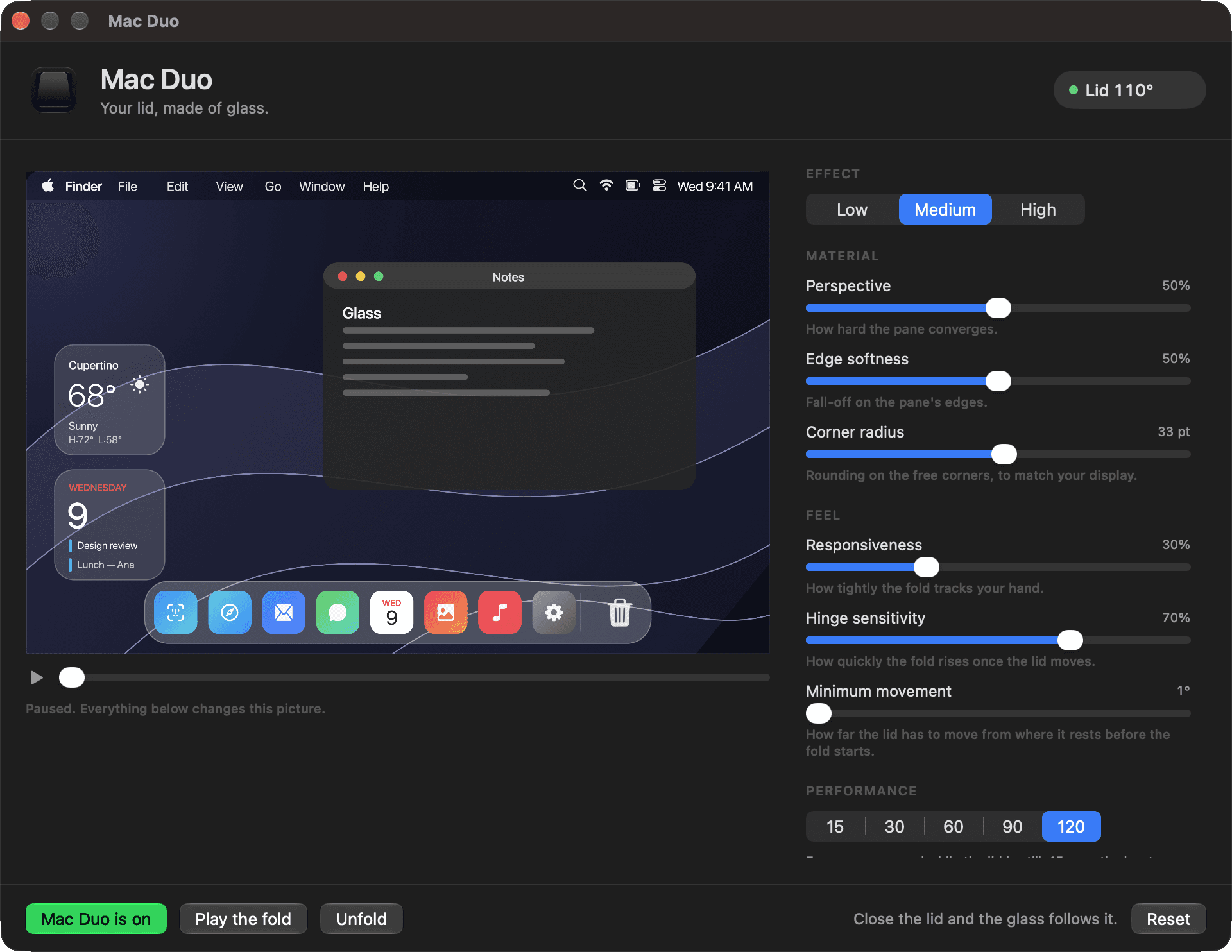
A live picture of the material sits beside the controls, with a scrubber that runs the fold by hand. Frost, Perspective and Edge softness shape the glass. Responsiveness and Hinge sensitivity decide how tightly it tracks. Play the fold to watch the whole thing, and Reset puts every setting back.
Creators
Mac Duo in the wild
See what people are making with Mac Duo.
Featured
Creator refund
Make a Mac Duo video. Get your money back.
Post a Reel, TikTok or YouTube Short showing Mac Duo. Hit 5,000 organic views and we'll refund 50% of your purchase. Hit 25,000 and we'll refund the full purchase price.
- What counts
- Instagram Reels, TikTok videos and YouTube Shorts only. The views are counted on the one qualifying video.
- Tag us
- The video must tag our account for its platform: @harixgohel on Instagram, @hari.gohel on TikTok or @hari-gohel on YouTube.
- Organic views
- Paid promotion, bots and fake engagement don't count.
- Checked by hand
- We review every claim ourselves before issuing a refund. We may ask for additional evidence if something needs clarification. Approved refunds are sent to the original payment method.
- To claim
- Email hello@studiogohl.co.uk with the video's link, a screenshot of its current view count, and the email address you bought Mac Duo with.
New in 1.3
The biggest update yet.
Mac Duo 1.3 is here. We rebuilt the experience around a smoother, cleaner fold.
What changed
- A cleaner start
- The fold now starts cleanly after a capture session ends, without briefly showing the previous animation frame.
- A cleaner sleep
- Mac Duo now stops screen capture when your Mac sleeps and stays stopped while the lock screen is visible.
- A smoother experience
- Further improvements make folds and transitions feel cleaner and more polished.
- External displays
- With an external display connected, closing your MacBook lid now leaves that display completely alone. The fold stays on the built-in screen, where it belongs.
- A cleaner reopen
- Reopening your MacBook lid now returns to your desktop cleanly, instead of briefly showing the fold again.
- Reset animation when paused
- A new option in the menu bar and in Feel settings. Pause the lid part-way and the animation smoothly returns to normal, then starts fresh when you carry on closing.
- A steadier hold
- Holding your MacBook lid still part-way now keeps the animation perfectly still, at any angle.
- Onboarding comes first
- New users now start with a short welcome to Mac Duo, instead of notes from earlier updates.
- Easier to catch up
- Missed a few updates? What's New now shows the most recent changes in a compact window that scrolls when there's more to read.
- Clearer onboarding
- The welcome screens now read more clearly in both Light and Dark Mode.
- A smoother restart
- Fixed an issue that could cause Mac Duo to freeze while restarting after you allowed Screen Recording.
The details
Before you buy.
Worth reading properly. One specific dependency, and one rough edge. Both are better known in advance.
In more depth: how Mac Duo turns your lid into glass, which MacBooks work with Mac Duo, what the MacBook lid-angle sensor is, and how Mac Duo reads your MacBook's lid angle.
How it works
- Lid sensor
- Reads the hinge angle from the Mac's own sensor, 120 times a second while the lid is moving. It folds relative to wherever you are holding the lid rather than from a fixed angle, and the same position always means the same glass — so opening retraces closing exactly.
- Live display
- Your screen is captured and the glass is rendered over it with Metal, so windows and wallpaper move as one surface rather than as layers.
- Intensity
- Low, Medium and High, with Perspective, Edge softness and Corner radius on sliders underneath — the corner rounding is there to match your own display.
- Feel
- Responsiveness sets how tightly the fold tracks your hand. Hinge sensitivity sets how much travel it spends per degree. Minimum movement sets how far the lid has to move before the fold responds at all.
- Menu bar
- Sits quietly in the menu bar, with the live lid angle up there if you want it.
- At rest
- Screen capture stops the moment the lid settles, and the fold drops to the stationary frame rate you choose: 15, 30, 60, 90 or 120. Moving the lid brings it straight back to full rate.
Requirements
- macOS
- 14.0 Sonoma or later.
- Mac
- A MacBook with a continuous lid-angle sensor, which Mac Duo reads to drive the fold in real time. Supported: 14-inch and 16-inch MacBook Pro from 2019 to 2026, and 13-inch and 15-inch MacBook Air from 2022 to 2026. Check your exact model and the sensor check before purchasing.Check compatibility →
- No sensor
- There is no timed fallback. Mac Duo checks for a usable sensor on first launch and tells you clearly if it cannot find one. Please check compatibility before purchasing: the compatibility guarantee covers a Mac that is listed as compatible and passes the sensor check.
- Desktop Macs
- No lid, no sensor, no effect.
- Permission
- Screen Recording, and it is not optional — the glass is built out of your live display, so there is nothing to render without it.
- Download
- Universal binary. 3.9 MB.
Private by design
- On your Mac
- The display is read to build the glass and those frames stay in memory. Nothing is written to disk, and nothing is sent anywhere.
- Only while moving
- Capture runs while the lid is in motion and stops the moment it settles.
- Privacy
- The Mac Duo app has no analytics, accounts, or tracking. It only connects to macduo.co.uk to check for software updates, and you can turn update checks off at any time.
- No account
- Pay. Download the disk image. Drag it to Applications. Nothing to create, nothing to enter.
One rough edge
The first launch takes one extra step.
Mac Duo is not yet notarized by Apple, so the first time you open it macOS will say it cannot verify the app is free of malware. Nothing is wrong. Open System Settings → Privacy & Security, scroll down, and click Open Anyway. That is the whole workaround, you only do it once, and we would rather you heard it here than after paying.
Read the full install guideYour lid, made of glass.
£2.99, once. 3.9 MB. Yours the moment you have paid.
Up to 5 Macs · Check compatibility first
Questions
Questions, answered.
Why does it need Screen Recording?
The glass is built out of your live display, so without that permission there is nothing to render. Capture runs only while the lid is actually moving. Nothing is recorded, saved, or sent anywhere. Mac Duo does not use analytics, tracking, or an account system. Its only network connection is an optional software-update check, which you can disable from the menu bar.
macOS says it cannot verify the app. Is that normal?
Yes, and it is expected. This build is not notarized by Apple, so the first launch shows a warning. Open System Settings → Privacy & Security, scroll down, and click Open Anyway. You only do it once. The old Control-click trick no longer works on recent macOS versions.
Will it work on my Mac?
Mac Duo requires a MacBook with a continuous lid-angle sensor. Supported: 14-inch and 16-inch MacBook Pro from 2019 to 2026, and 13-inch and 15-inch MacBook Air from 2022 to 2026. Not supported: MacBook Air M1, 13-inch MacBook Pro, MacBook Neo, and desktop Macs, which have no lid. If you are not sure, run this in Terminal before purchasing. It only reads, and it prints one plain answer:
hidutil list --matching '{"PrimaryUsagePage":32,"PrimaryUsage":138}' 2>/dev/null | awk '$4==32 && $5==138 {found=1} END {print "Mac Duo compatibility check"; print ""; if (found) {print "✓ Required lid-angle sensor detected."; print " Your Mac appears compatible with Mac Duo."} else {print "✕ Required lid-angle sensor not detected."; print " Your Mac does not appear to expose the continuous lid-angle sensor"; print " Mac Duo requires. Please check the supported MacBook list before buying."}}'"Required lid-angle sensor detected" means your Mac appears compatible. "Not detected" means Mac Duo is not expected to work on that Mac. It is a compatibility check rather than an absolute guarantee either way, because Mac Duo searches more broadly than one command can when it starts and confirms it can actually read a continuous angle. See the compatibility page for the full list and the compatibility guarantee.
Examples
The original wedge-shaped M1 MacBook Air and the 13-inch M1 MacBook Pro do not expose the continuous interface Mac Duo needs, despite being Apple silicon. Separately, many MacBooks have a sensor that only detects when the lid is shut, for sleep. That one cannot drive the fold, which is why a Mac can have "a lid sensor" and still not run Mac Duo. Having an accelerometer, a gyroscope or an ambient light sensor does not count either. There are also variants in how Apple exposes the sensor across generations, which is why Mac Duo checks the sensor itself rather than going by model name. Desktop Macs have no lid to read, and there is no timed fallback.
How many Macs can I use it on?
Up to five of your own. There is no licence key, no activation and no account — Mac Duo trusts you, and your download link is tied to your email if you need it again.
Is there a subscription?
No. One payment, and the app is yours. No accounts, no licence keys, no trial countdown.
What about updates?
If there is an update we will email you, and you can download it with the same email address you bought with. Automatic updates are planned for a later version.
Does it drain the battery?
Very little. While the lid is still, screen capture is stopped and the fold drops to your chosen stationary frame rate, which is 15 by default and the lowest of the five settings. The moment the lid moves it steps up to 120 times a second, capture starts and the GPU draws, for exactly as long as the lid is moving. Capture shuts down again a second and a half after you stop. A lower stationary frame rate does less work while the lid is sitting still.
What if it does not work on my Mac?
If your MacBook is listed as compatible and the sensor check detects the required interface, but Mac Duo still cannot read the lid angle and work as described, email hello@studiogohl.co.uk. We will investigate and provide the appropriate remedy, including a full refund where required. If your MacBook is listed as unsupported, or the sensor is not detected, Mac Duo is not expected to work on it, so please check before purchasing. If you buy anyway, the voluntary compatibility guarantee does not apply and we may offer a 50% goodwill refund at our discretion. None of this affects your statutory consumer rights.
How is the MacBook fold count calculated?
425 Mac Duo customers and counting.
The fold estimate is calculated from how long those customers have had Mac Duo, using an assumed average of 8 lid cycles per day. The number updates automatically as new customers join and existing customers continue accumulating days.
Close the lid. See what happens.
Mac Duo is a native macOS app by Studio Gohl, built to bring the iPhone Duo fold to a MacBook.